• Photography
  • About
  • Contact
  • Light Writing

Scott W Gonzalez

  • Photography
  • About
  • Contact
  • Light Writing

ISO

Good afternoon,

Now I will move onto ISO (International Standards Organization) or ASA (American Standards Association which might be seen in older publications) which is a measurement of how sensitive to light a sensor or film is. I sometimes shoot film still and enjoy it, I even have had my daughters use film.

The ISO can usually be changed in almost any setting on a DSLR type camera, and if I recall quite a few point and shoot cameras as well. Unless it is turned to auto. Auto from my experience doesn't use the whole range that the camera is capable of. I have cameras that are a few years old and they are both capable of 16,000 (more on this in a bit). I don't ever use them at that setting but it is there, I have gone up to 3200 with decent results though. ISO goes up/down in stops, it doubles every time for one full stop. 50, 100, 200, 400, 800, 1600, 3200, etc... from 12800 to 16000 isn't a full stop though and higher end cameras can go in between full stops (64, 120, and so on). If you are in A or S priority then the setting will double or half when decreasing or increasing the ISO in full stops accordingly. 

Some of you might be thinking "why not always use the highest ISO?" Well every increase in ISO adds noise or grain to the image. It is the price that we pay for more light gathering ability. Somethings the noise isn't an issue with (things not needing fine detail, documenting events or just needing to have a photo, night shots) and others it is (wanting fine detail, portraits, stationary items).

I kept the aperture at f5.6 while changing the shutter speed to compensate from 30 seconds at 50 ISO to 1/10 of a second at 16000 ISO. To see the detail lost look at the books and the wood grain. These are 100% crops of the pictures.*I changed it fr…

I kept the aperture at f5.6 while changing the shutter speed to compensate from 30 seconds at 50 ISO to 1/10 of a second at 16000 ISO. To see the detail lost look at the books and the wood grain. These are 100% crops of the pictures.

*I changed it from the previous pictures. I felt these demonstrated the ISO difference better.

The highest acceptable ISO depends on what we are taking pictures of and what we are using the image for. Landscapes low ISOs work well because we usually mount on a tripod for them for sharpness and high dof. Action we want a high ISO to stop the motion and get a sharp stopping of it. Indoor either high ISO or a flash, my personal experience is that an image taken at a get together is not usually going to be blown up to a large enough size to make higher ISO degrade the print.
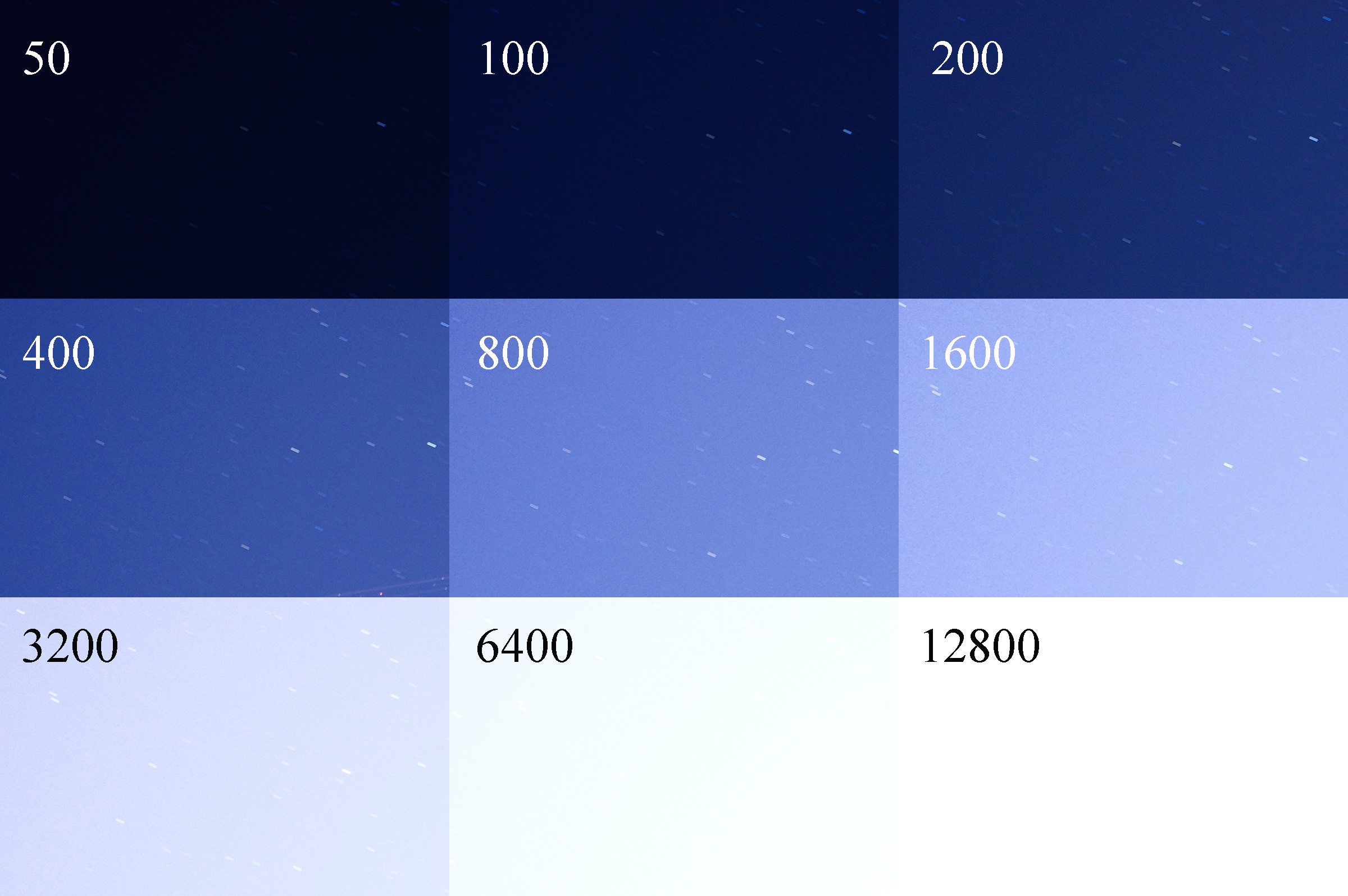
 

I kept the aperture at f2.8 and the shutter at 30 seconds, the ISO was changed to show the difference between the light sensitivity. More stars can be seen until it gets blocked out by ambient light. At 400 there was a plane flying through the frame…

I kept the aperture at f2.8 and the shutter at 30 seconds, the ISO was changed to show the difference between the light sensitivity. More stars can be seen until it gets blocked out by ambient light. At 400 there was a plane flying through the frame.

*I changed the image to 100% crops of the upper left corner so the stars would be more visible.

So far we have covered the points on the exposure triangle, next week I think that we should move onto the Histogram which more or less defines a "perfect exposure." Go on out and shoot, experiment with new knowledge. Change your settings and see what you can do.

~Scott

tags: film, ISO, exposure triangle, adjustment, exposure, education, learning, example, teaching, ASA
Sunday 09.10.17
Posted by Scott W Gonzalez
 

Shutter Priority

Good Evening,

Shutter priority is not one that I use often. There is nothing wrong with it I just never really used it. After taking this series of photos I will make an effort to use it. I have seen the times that it could be useful. Such as when being more worried about stopping motion in the image as opposed to having a certain amount of the photo in focus. You control the shutter speed and ISO then the camera sets the aperture (or tries to within the lens limits) to what would make a "perfect" aperture using the exposure triangle.

If you are taking pictures of cars in motion, people running or playing sports, you have an artistic idea that has some motion blur and you want to control how much is blurred, you are trying to make a busy place look empty, taking pictures of fans, etc, then this would probably be the way to go. It can be used for all of those and more.

Shutter.jpg

These images were taken at 800 iso with a tripod mounted camera. The first was and last images had a blinking aperture which means each was outside of the "perfect" exposure. 1/640 sec was a stop below what the aperture could adjust for and 1/2 second was a stop above. If you notice the first one is dark compared to the others and the last is brighter. Again we can see the triangle at work in these captures. For each stop (keep in mind these are full stops) the the shutter speed changes the aperture changes one stop too. I know that Sony and Canon have the option, not sure about Nikon I haven't used them enough, to change the stop adjustment to either 1/3 stop or 1/2 stop when changing the shutter speed or aperture. I hope this collage provides a good example of shutter speed adjustments. Now go out and shoot.

~Scott

tags: shutter, speed, adjustment, priority, exposure triangle, exposure, teaching, learning, example, collage
Sunday 09.03.17
Posted by Scott W Gonzalez
 

Aperture priority

Good Evening,

I figured that I would take a step into mode dial settings. I was discussing it with a fellow patron of the B&B the Wife and I stayed at to see the eclipse. He asked for some pointers and I gave him what I could in the short time we saw each other. The discussion went to the mode dial and how to use it.

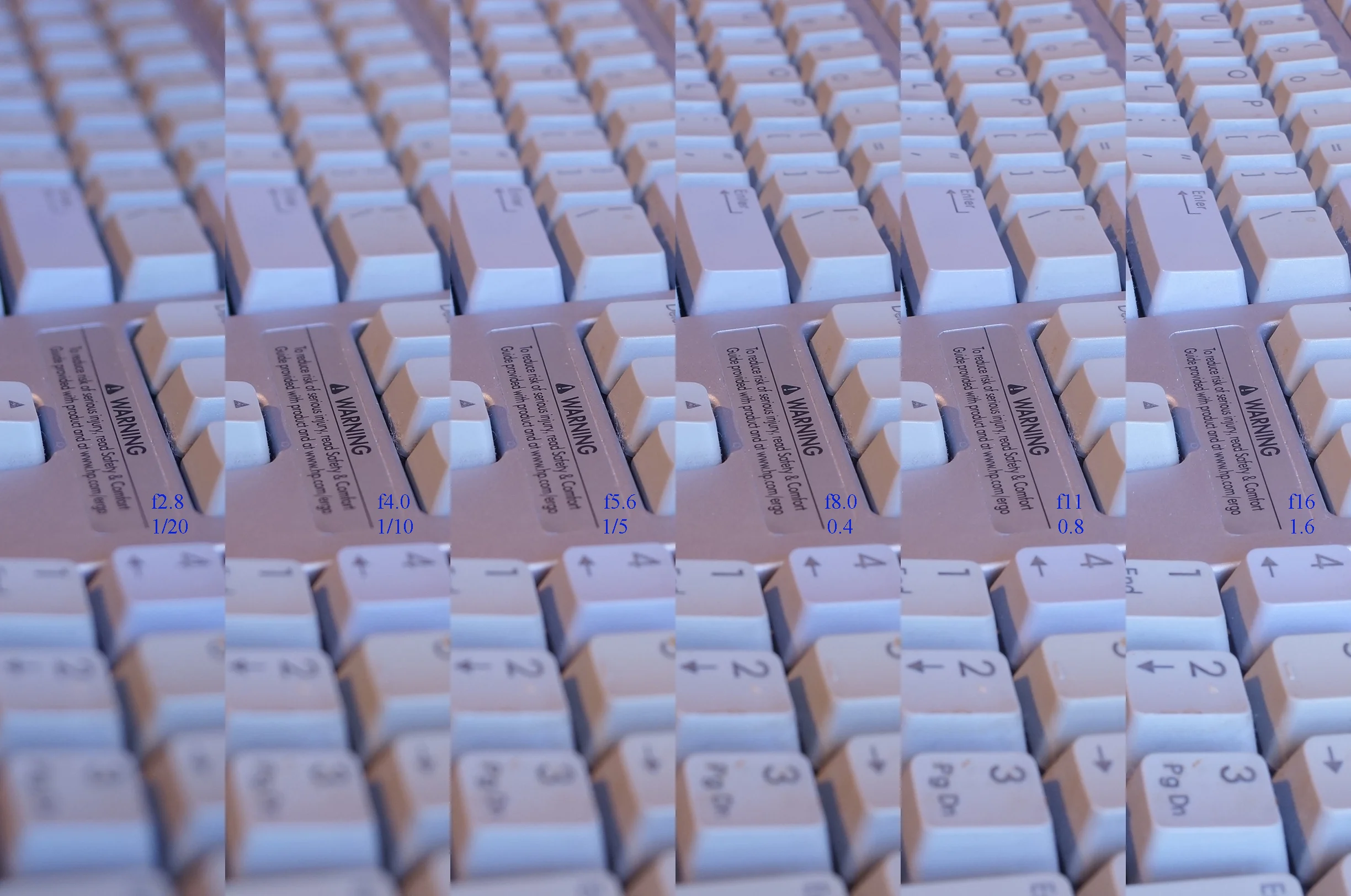
Most of the time I use Aperture priority (A or Av). I like to have control of depth of field. This is again a personal preference, and just one corner of the triangle. If it doesn't work for me then I usually jump to Manual. I put together this image to illustrate the difference.

Aperture.jpg

All were shot at 400 iso in jpeg from an a57 with a 28mm lend mounted on a small tripod. Each time I went up a full stop (smaller number smaller in focus area) in the aperture and in turn the shutter went up a full stop too, to compensate for the light change. The difference between all of them is how much of the keyboard is in focus. The aperture controls depth of field and is a great tool to isolate what we want in focus in an image. It is also good for low light situations as well. If you are in one you can open it wide which allows more light in a shorter period of time. Such as a birthday party when the candles are lighting up a face, with a wide aperture you can have other people blur away if you know what you are doing. Go out and shoot.

~Scott

tags: aperture, exposure, exposure triangle, education, example, teaching, learning, shutter
Sunday 08.27.17
Posted by Scott W Gonzalez
 

Exposure Triangle

Good Morning,

The exposure triangle. It seems like a simple concept if you understand some photography. It starts off with "perfect" exposure in the middle, ISO on one corner, shutter speed on another, and aperture on the last. Showing that it you change one it has an effect on the other ones to maintain the "perfect" exposure in the middle. If we change the shutter speed one stop we can either change the ISO 1 stop or the aperture 1 stop, or a combination ISO 1/3 and aperture 2/3 and so forth.

There have been many alliterations of this. I am going to use my own. Imagine cooking an egg. Sunny side up is a "perfect" exposure, with the fire being the aperture, time being the shutter speed, and the pan the ISO. If we have a small fire (small aperture, high f stop), then we would have to either more the pan closer to the fire (increase the ISO) or cook it for longer (keep the shutter open for longer) to cook the "perfect" egg, if we didn't change something then the egg would be under cooked (underexposed) and we risk getting salmonella. Now if we have a large fire (large aperture, small f stop), then we could move the pan, or we could cook the egg for a shorter period of time. If we didn't change something then the egg would be burnt (overexposed). I could go on all day typing each option changing and the others but I am not going to, I think that you probably get it with those two.

After understanding it you can use it to take better pictures that are outside of the "perfect" exposure. Going back to the egg story, some people want their eggs runny, others like them a bit dry. Is either way wrong? No it is a personal preference. The "perfect" exposure doesn't have leeway for those preferences. That is a story for another day though. So go out and shoot.

~Scott

tags: exposure triangle, education, exposure, teaching, learning, speed, shutter, adjustment, aperture, ISO
Thursday 08.17.17
Posted by Scott W Gonzalez
 

RAW vs JPEG

Good Evening,

So this is a discussion that I get into often when talking to people just getting into photography. It usually starts off with "how do I fix this?" or "why do the pictures look different?" It is usually a white balance issue and people leaving it on Auto White Balance (AWB). My response is usually turning off AWB and setting it for each shot. Which then delves into fixing it after the fact, I ask if it is a jpeg or raw file. Often the response is "what is a raw file?" or if they know what it is they say they use jpeg because they are a smaller file which means they can take more pictures.

I compare it to having a negative and having a print. With the negative you can make wide adjustments to a picture, brighten/darken, increase/decrease contrast, apply filters, change it to B/W, etc all without making changes to the negative. Can't really do much of that with a print unless you take a picture of the print and make it into a negative.

Now for those that haven't ever dealt with negatives I say it is basically taking all the combinations that you can set up between changing the WB 6 and Picture Style(Canon) or Picture Control (Nikon) or Creative Style (Sony). Each one has around 6 WB settings and 6 picture settings which is like taking 36 pictures with one shot because all of that can be changed later on without altering the original file. Granted this latitude comes at a cost of time the images have to be processed before being used.

If you want a quick picture take a jpeg, if you want a lot of range take a raw, if you want both you can probably do that too with a raw+jpeg setting.

~Scott

tags: education, files, raw, jpeg, format, white balance, black and white, B&W, B/W, BW, WB, teaching, learning
Thursday 08.17.17
Posted by Scott W Gonzalez
 

Hello

I am Scott and welcome to the informative portion of the website. I plan on writing instructional blogs. Not sure how well it will turn out, i get asked often enough about how to do things or for tips that I felt it should be included. It will probably start off with rather easy things (exposure triangle, common settings, etc...) then progressively get into detailed aspects of photography and post processing (multiple flashes, removing people, blending images, etc...). Comments and requests about how to do a certain technique that is in one of my photos are welcome. I hope that this can become an helpful part of the site.

~Scott

Wednesday 08.09.17
Posted by Scott W Gonzalez
 
Newer / Older

Powered by Squarespace.